The Complete Process
Seven Decisions Behind a Useful HVAC Calculator
A reliable implementation is more than pasting code into a page. Treat the project as a connected customer and sales workflow.
Define the Scope
Before You Add a Calculator, Decide What It Should Price
Start with the work that can follow a structured path. Residential replacement is often a good fit because contractors can organize common equipment configurations and pricing inputs without pretending every project is identical.
Good Fit for Online Estimating
May Require a Different Workflow
This is not a universal rule. Emergency repairs, diagnostics, unusual projects, and complex ductwork may require discovery before meaningful pricing is possible.
Step 1
Build Your HVAC Pricing Logic
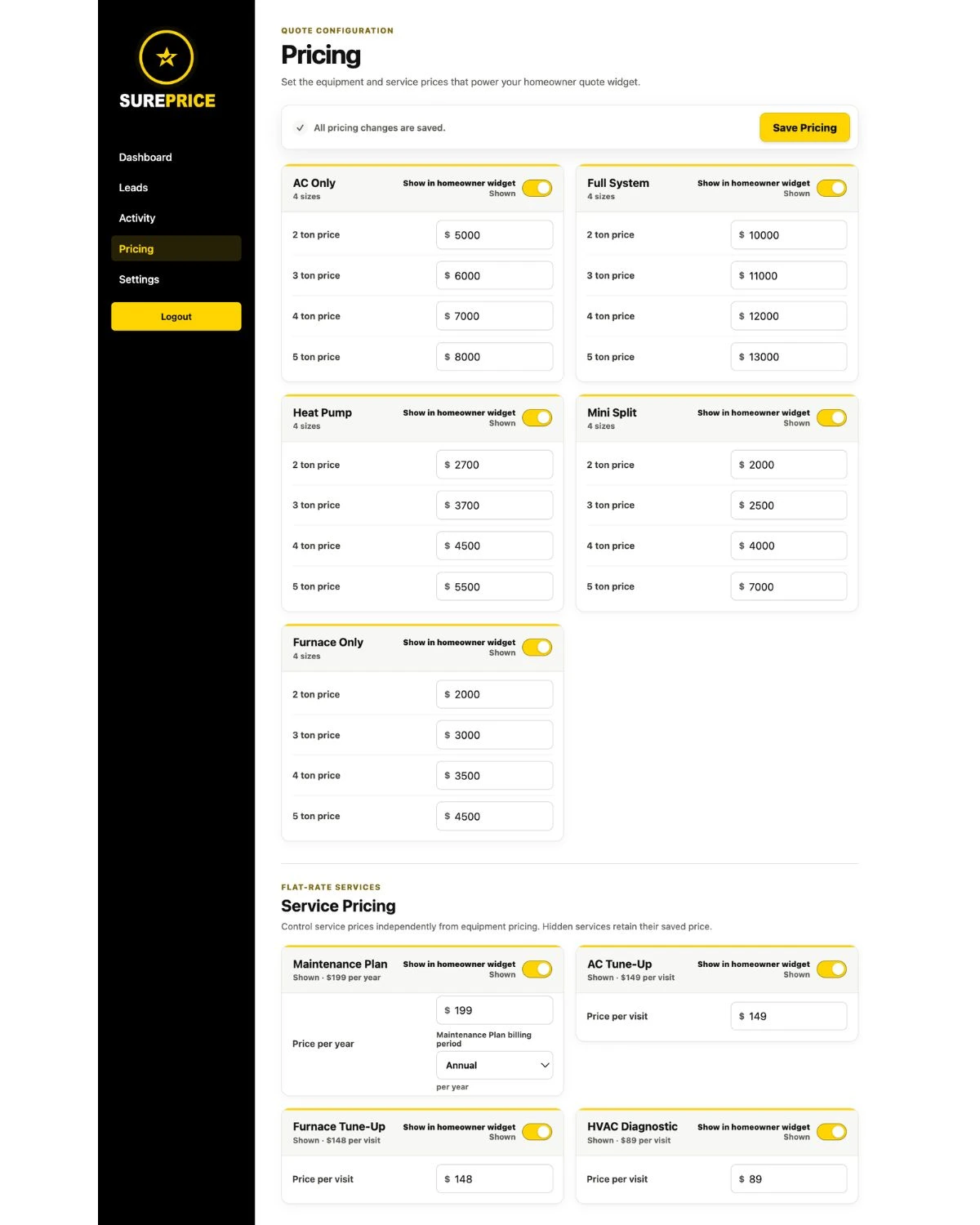
The calculator needs a pricing model behind the homeowner interface. Depending on the contractor's business, that can include system type, equipment options, tonnage categories, home-size ranges, installation pricing, equipment tiers, optional add-ons, maintenance plans, financing or payment presentation, and relevant service fees.
Decide which inputs actually affect the online estimate and which conditions must be verified later. Square footage can help guide an estimate, but it does not determine correct HVAC sizing on its own. Final equipment sizing and installation requirements may still require a professional load calculation, inspection, and review of the property.
The goal is not to reproduce every possible field condition online. It is to create useful pricing paths around the contractor's real replacement offerings and reserve project-specific verification for the appropriate stage.
Step 2
Decide What Questions Homeowners Need to Answer
Too few questions can leave the estimate without useful context. Too many can turn the experience into a tedious qualification form. Ask only what materially helps identify the replacement, narrow the pricing path, select relevant options, establish service-area eligibility where necessary, or give the team useful lead context.
Good Calculator Experience
Frustrating Experience
If the page promises an instant estimate or pricing calculator, the homeowner should receive meaningful pricing information at the end—not discover that the experience was only a contact form.
Step 3
Choose How the Calculator Will Be Built
There are three common implementation approaches. The right one depends on budget, control, internal technical resources, and the experience the contractor wants to maintain.
Step 4
Add the HVAC Pricing Widget to Your Website
A hosted pricing widget can typically be added through an embed supplied by the software provider. Depending on the implementation, the contractor's site may load the pricing experience within an existing page or send the visitor into a hosted experience.
WordPress, Elementor, custom HTML websites, and many other website builders can support custom code blocks or links, but the exact installation method depends on the website and platform. Confirm compatibility rather than assuming every builder handles embeds identically.
Before launch, review the responsive layout, page width, load speed, branding, placement, and clarity of the CTA that opens the calculator. Test the entire experience—not only whether the first screen appears.
Placement Strategy
Where Should the HVAC Calculator Go?
A calculator hidden deep in the website will be difficult for replacement shoppers to find. Place entry points where visitors already express replacement or pricing intent.
The best placement depends on how traffic reaches the site. One calculator experience can support multiple entry points instead of creating unrelated pricing workflows throughout the website.
Step 5
Decide When to Capture Contact Information
A contractor can ask for contact information before showing pricing, during the estimate, or after providing some pricing context. Each approach balances lead capture and homeowner friction differently.
Earlier capture can preserve more contact opportunities but creates a commitment before the visitor sees the result. Later capture can first demonstrate that the experience is useful, but some visitors may leave before identifying themselves. There is no universal best point without considering the market and workflow.
The key is expectation: homeowners should understand they are using a real pricing experience rather than a generic lead form disguised as a calculator.
Step 6
Give the Homeowner an Actual Estimate
If the website says “Get an Instant HVAC Estimate,” the result should include useful pricing information. Depending on the implementation, that may be a configured price or range, the system or equipment context, payment information where applicable, clear estimate language, and an explanation of what still requires professional verification.
Online Estimate
- Uses contractor-configured logic
- Provides useful price context online
- Reflects information the visitor supplied
- Clearly reserves field verification
Final Contract Price
- Follows professional review
- Confirms sizing, equipment, and scope
- Accounts for installation conditions
- Can become the project agreement
For a deeper look at this distinction, read the guide to HVAC pricing transparency and showing prices online.
Step 7
Decide What Happens After the Estimate
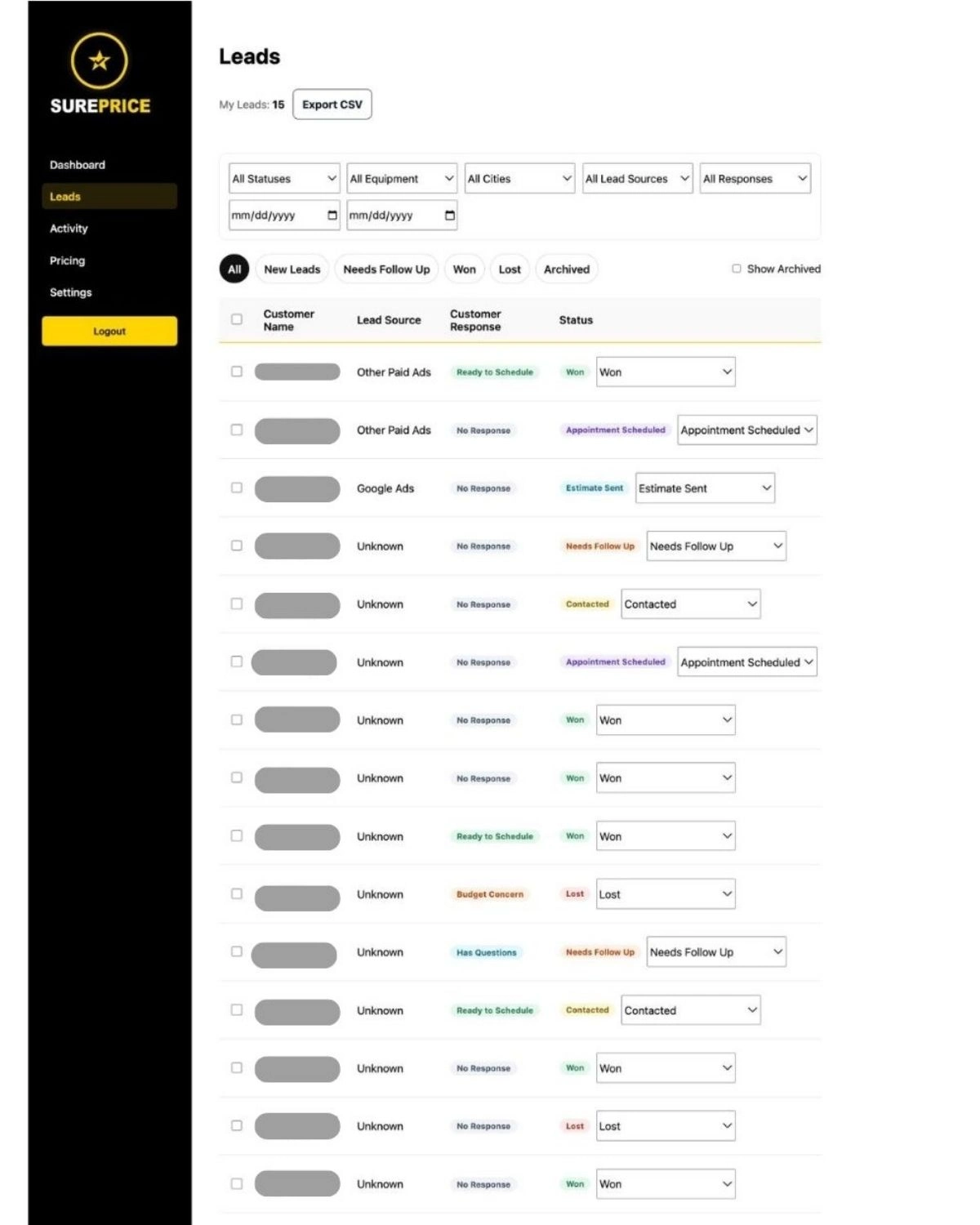
Generating the number is only half of the workflow. After an estimate, a contractor may want to capture customer information, know which system was priced and the estimated amount, record buying stage or lead source where collected, notify the sales or office team, offer a booking next step, and follow up through the existing sales process.
An online pricing tool can handle the front of the customer journey without replacing the contractor's CRM, scheduling software, or operating systems. Plan the handoff so the opportunity does not become disconnected from the team responsible for the next conversation.
Lead Context
What Information Should Your Team Receive?
A useful calculator result is more than a name and phone number. The exact fields depend on the platform and configuration, but useful context can include:
A Practical Path
How SurePrice Handles This
SurePrice gives HVAC contractors a configurable online pricing experience that can be added to their website. Contractors control their pricing and available replacement options. Homeowners answer guided questions and receive an online estimate, while the contractor receives the resulting lead and quote context.
The homeowner can then move into the contractor's normal sales or booking process. SurePrice is not intended to replace the contractor's CRM or operational systems; it supports the pricing and lead-capture experience at the front of that process.
Explore the complete SurePrice HVAC pricing tools, or start with the broader explanation of how an online HVAC quote tool works.
Launch Preparation
HVAC Pricing Calculator Launch Checklist
- Choose which HVAC services can be estimated online.
- Define pricing logic and configure equipment or options.
- Determine which homeowner questions materially affect the estimate.
- Decide how estimates will be labeled.
- Determine the contact-capture strategy.
- Choose calculator placement and entry points.
- Configure the next step after pricing.
- Verify lead notifications and quote context.
- Test desktop and mobile layouts.
- Test every pricing path.
- Confirm links and booking destinations.
- Review pricing regularly after launch.
Implementation Pitfalls
Common Mistakes to Avoid
Asking too many questions
Collect only what improves pricing or lead context.
Calling it an instant quote without showing pricing
Deliver the useful result the CTA promises.
Treating the estimate as professional sizing
Keep load calculations and field verification in the proper workflow.
Hiding the calculator deep in the website
Create visible entry points where replacement shoppers already look.
Forgetting mobile users
Test questions, controls, estimates, and CTAs at small screen widths.
Capturing a lead without quote context
Make the homeowner's pricing journey useful to the follow-up team.
Letting online pricing become outdated
Assign responsibility for regular reviews and cost-driven updates.
Sending the homeowner to a dead end
Offer an appropriate booking, contact, or follow-up step after pricing.
Common Questions
HVAC Website Pricing Calculator FAQs
How do I add an HVAC pricing calculator to my website?
Define what the calculator will price and the logic behind those estimates, choose a custom, generic, or dedicated pricing platform, add its hosted or embedded experience to your website, and test the complete pricing and lead workflow before launch.
Can I add an HVAC calculator to a WordPress website?
Usually, if the selected platform provides an embed or hosted experience and the WordPress setup allows the required code block or link. Confirm compatibility with the pricing provider and test it in the actual site theme.
What information should an HVAC pricing calculator ask for?
Ask only for information that helps identify the replacement, select the appropriate pricing path, determine relevant options, establish service eligibility where needed, or provide useful lead context.
Should an HVAC pricing calculator show an exact price or a range?
Either can be appropriate depending on the contractor's pricing model and how predictable the work is. The result should be meaningful, clearly labeled, and explain which project conditions still require verification.
Can an HVAC pricing calculator determine the correct system size?
An online calculator can collect home size or equipment categories to support an estimate, but it should not replace professional sizing, a load calculation, or inspection of the home.
Where should I put an HVAC pricing calculator on my website?
Useful placements include a dedicated pricing page, replacement service pages, the homepage or navigation, relevant landing pages, and educational content where visitors already have pricing intent.
Should I require contact information before showing HVAC pricing?
There is no universal best point. Requiring it earlier may support lead capture but adds friction, while asking later can let the homeowner first understand the experience. In either case, the calculator should deliver the pricing information it promises.
What happens after someone completes an HVAC estimate?
The homeowner should receive a clear result and next step. The contractor may capture contact, system, quote, source, and buying-stage context, notify the appropriate team, and continue through its existing sales or booking process.
Do I need a developer to add an HVAC pricing calculator?
It depends on the implementation. A custom calculator usually requires development, while a hosted or embedded platform may only require access to the website's custom code, block, or link settings.
Can an HVAC pricing calculator work with my existing CRM?
That depends on the pricing platform and the contractor's workflow. Evaluate how leads are delivered, what quote context is included, and how the team will move that information into its existing customer-management process.
Bottom Line
The Embed Is Only One Part of the Implementation
Adding an HVAC pricing calculator to your website is not primarily an embed-code project. The important decisions are what you will price, what questions homeowners need to answer, how the estimate is calculated, what pricing they actually see, and what happens after they receive it.
A well-designed HVAC pricing experience should give the homeowner useful information while giving the contractor enough context to continue the sales process.